Retro Sci-Fi: Mobile
RETRO SCI-FI TERMINAL: MOBILE
A single HTML file that boots like hardware from 1983, rebuilt for phones and touch.
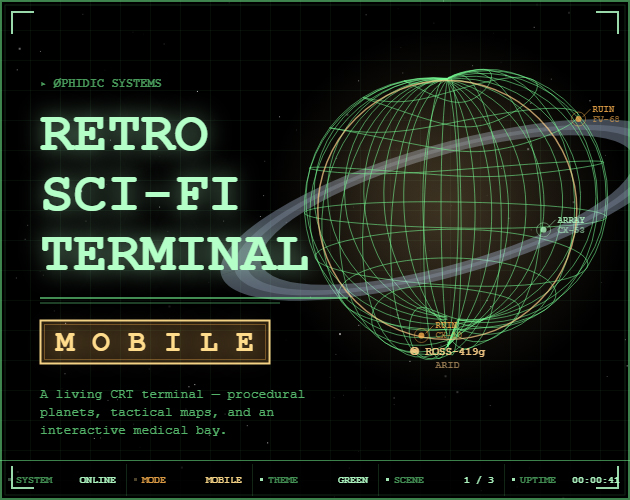
Four live pages, a settings menu, procedural planets, radar contacts, and full-screen alerts. Nine color themes, from phosphor green to amber to a red alert. Swipe between pages, tap the panels to scan and ping, swipe up on a planet to roll a new world. No install, no build, no server. Open it and it is running.
▸ CONTROLS
Swipe ◀ ▶ | Change page |
Tap footer | Jump to a page directly |
Tap ♪ | Mute / unmute audio (footer, right of the page buttons) |
☰ | Open settings (top bar, right side) |
! | Trigger an alert |
⟳ | Reboot the system |
| Tap radar | Fire a radar ping |
| Tap planet | Run a planetary scan |
| Swipe ↑ planet | Regenerate the planet |
| Tap waveform | Trigger a waveform wobble |
M | Mute / unmute (keyboard) |
Esc | Open / close the settings menu |
R | Reboot the system (keyboard) |
A | Regenerate the planet (keyboard) |
← → | Change page (keyboard) |
▸ COLOR THEMES
The whole interface changes color, not just the text. Panels, planet, radar terrain, and every glowing element follow the active theme.
| GREEN | Classic phosphor terminal |
| AMBER | Warm monochrome, TNG-style |
| BLUE | Cool scientific readout |
| WHITE | Clinical, medical-panel bright |
| RED | Alert-bridge red |
| VIOLET | Deep lavender with pink accents |
| CYCLE | Slowly crossfades through all six base palettes on a loop |
| AUTO | Holds each palette for a tunable stretch, then blends into the next |
| REBOOT | Picks a fresh random palette every time the system reboots |
CYCLE and AUTO have their own sliders for hold time and blend time, so you can set the whole thing to drift through colors over a couple of minutes, or snap between them fast. REBOOT pairs well with the automatic reboot cycle, so every crash-and-recover feels like a fresh machine coming online.
Theme planet color. By default, planets pick their color from their biome (oceanic worlds are blue, volcanic worlds are red-orange, and so on). Flip the PLANET USES THEME COLOR toggle in the Colors tab to override that, and every world will render in whatever the current theme color is. Switch themes and the planet follows along instantly.
▸ SETTINGS
Tap ☰ in the top bar, or press Esc. Press Esc again or tap the X to close. Four tabs: Display, Events, Colors, Controls.
- Display: scanlines, vignette, and grid background toggles
- Events: alerts on/off, ambient scan toggle, alert rate, alert duration, reboot rate, and scan rate sliders
- Colors: nine palettes, auto-theme hold and blend sliders, and the planet-uses-theme-color override
- Controls: full touch reference and a page list, right there in the menu
▸ FOUR PAGES, ALL ALIVE
| RADAR | Big tactical display with procedural terrain and hostile contacts, plus a scrolling SYS LOG, a status port grid, and six live gauges underneath |
| ORBITAL | A procedurally generated planet with rings and sites, next to a two-column planetary readout, a live TOPO MAP with an ABC/123 grid, and a square HEX MONITOR |
| WAVE | A waveform that drifts between calm green and agitated orange, a rolling line array, and gauges plus a SYS LOG |
| ALL | Every major widget at once, arranged for the small screen |
▸ AMBIENT SCAN
Planet and radar do quiet sweeps on their own when nothing else is happening. The planet gets scanned by a red ring that sweeps top-to-bottom and reveals new sites; the radar fires contact pings that spawn fresh suspicious blips. Rate is tunable in the Events tab, or you can turn it off entirely.
▸ ALERTS
Full-screen warning overlays fire every few minutes: LOW OXYGEN, HULL BREACH, REACTOR OVERLOAD, FIRE DETECTED, and four more. Each one hits the terminal log and plays a descending three-note tone.
▸ BOOT SEQUENCE
On cold start the terminal boots straight from the power icon: OVERALL and LOADING bars fill while fake system files tick past, the icon fades from red to amber to the current theme color, then it types out a BIOS checklist and hands off to the OS. On reboot, a CRT collapse plays first, then the power-icon boot follows, then the BIOS text. Same on demand when you tap ⟳.
▸ NOTES
- Runs entirely in the browser. No server, no install, no build.
- Uses Web Audio for the hum, tones, and glitches. Tap once to enable, then use the ♪ button in the footer or
Mto mute. - Settings and theme are saved between sessions when you run the downloaded file. The in-browser embed may not remember them on Safari and Firefox.
- Designed for phone screens and touch input. Landscape works best.
- Best viewed fullscreen.
Leave a comment
Log in with itch.io to leave a comment.